> ## Documentation Index
> Fetch the complete documentation index at: https://docs.eximpe.com/llms.txt
> Use this file to discover all available pages before exploring further.
# Webhooks
> Learn how to set up and configure webhooks to receive real-time payment notifications from EximPe. This guide covers webhook setup, testing, and best practices for integration.
***
## What are Webhooks?
Webhooks are **real-time server-to-server (S2S) notifications** that EximPe sends to your backend when important events occur. Unlike browser redirects that can be interrupted, webhooks ensure reliable delivery of payment status updates directly to your server.
Notifications sent directly to your server with automatic retries
Instant notification of payment events as they happen
Works even if customer closes the browser or loses connection
Encrypted and signed for authenticity and data integrity
***
## Supported Events
EximPe sends webhooks for these key events:
**When:** Customer completes payment
**Use Case:** Update order status, send confirmation
**When:** Payment attempt fails
**Use Case:** Retry payment, notify customer
**When:** Refund is processed
**Use Case:** Update inventory, notify customer
**When:** Merchant account activated
**Use Case:** Enable payment collection
**When:** Funds transferred to merchant
**Use Case:** Update accounting records
**When:** Subscription status changes or updates
**Use Case:** Track subscription lifecycle, update billing records
***
## 🛠️ Setup Guide
### Step 1: Prepare Your Endpoint
Ensure your server has a **public HTTPS URL** accessible from the internet, a **POST endpoint** that can receive webhook data, **200 OK response** capability, and support for `application/json`.
### Step 2: Configure Webhook URL
- Log into your **EximPe Dashboard**
- Navigate to **Developer Section**
- Enter your webhook URL
- Save configuration
- Whitelist EximPe IP addresses - Configure your firewall to only accept webhooks from EximPe's IP ranges (found in Developer Section)
- Contact EximPe Support with your webhook URL
- Provide your server's IP address
- EximPe will whitelist your endpoint
- You'll receive EximPe's IP range for firewall configuration
- Whitelist EximPe IP addresses - Configure your firewall to only accept webhooks from EximPe's IP ranges
### Step 3: Test Your Integration
Log all incoming requests on your server to monitor webhook delivery
Make a test payment in sandbox environment to trigger webhooks
Verify webhook receipt and processing in your logs
Ensure your endpoint returns 200 OK response codes
***
## 🔐 Security & Verification
EximPe signs each webhook with an HMAC signature to ensure authenticity:
### Verification Steps
Extract the signature from the X-Webhook-Signature header in the request
Get your Encryption key
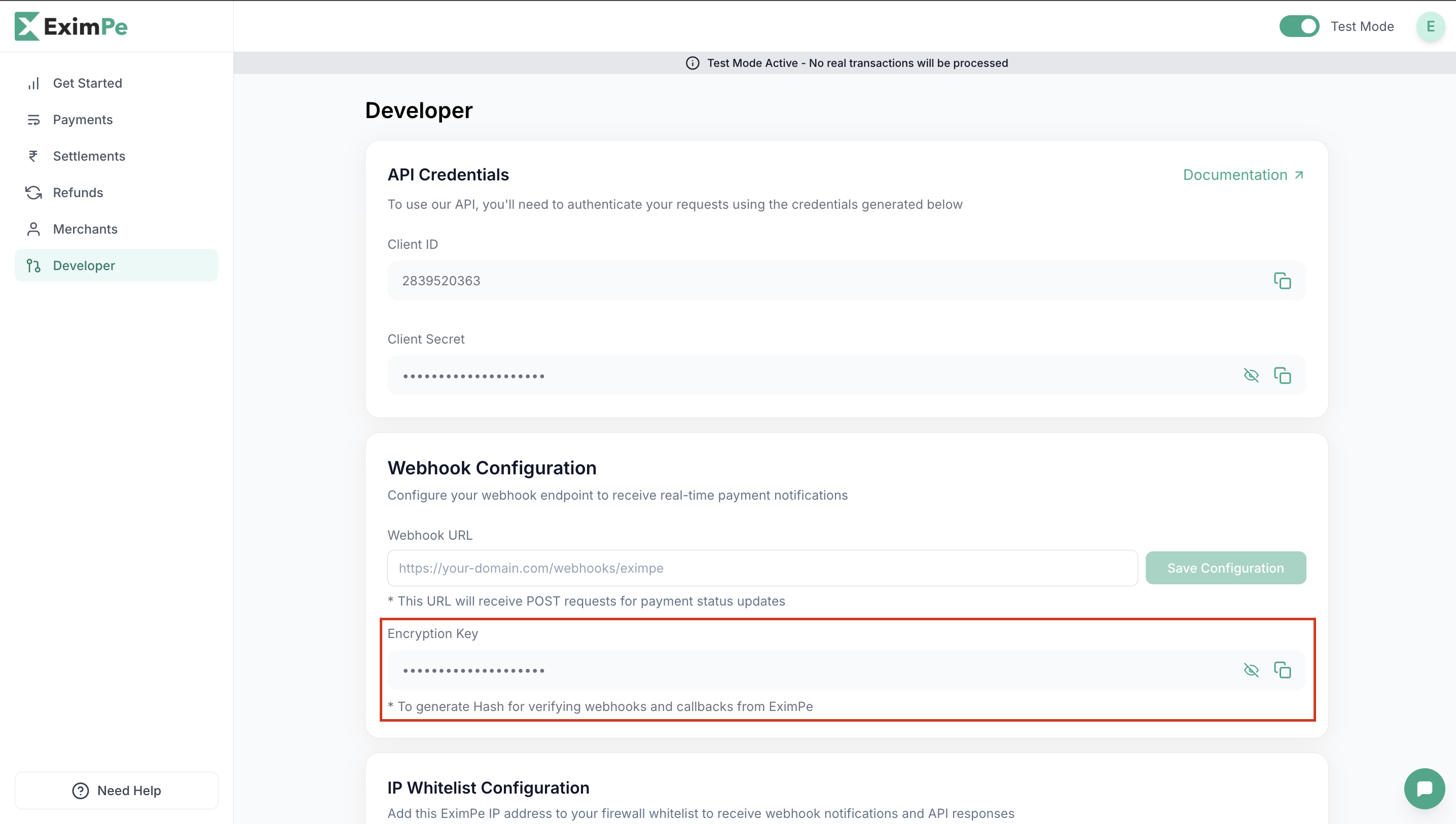 Recreate the signature using HMAC-SHA256:
- Use your Encryption Key as the secret
- Use the raw JSON body as the message
- **Important:** If reconstructing from JSON object, ensure consistent serialization using `json.dumps()` with `sort_keys=True` and `separators=(",", ":")` to match EximPe's format
- Generate HMAC-SHA256 hash
- Convert to hexadecimal string
Compare signatures - they should match exactly
### Code Examples
```javascript Node.js theme={null}
const crypto = require('crypto');
function verifyWebhookSignature(payload, signature, encryptionKey) {
// Create HMAC using your Encryption Key
const hmac = crypto.createHmac('sha256', encryptionKey);
// Update with the raw JSON body
hmac.update(payload, 'utf8');
// Generate the expected signature
const expectedSignature = hmac.digest('hex');
// Compare signatures
return crypto.timingSafeEqual(
Buffer.from(signature, 'hex'),
Buffer.from(expectedSignature, 'hex')
);
}
function generateSignatureFromObject(webhookData, encryptionKey) {
// If you need to recreate signature from a JSON object
// Use the same serialization as EximPe
const payloadJson = JSON.stringify(webhookData, Object.keys(webhookData).sort());
const hmac = crypto.createHmac('sha256', encryptionKey);
hmac.update(payloadJson, 'utf8');
return hmac.digest('hex');
}
// Usage in Express.js
app.post('/webhook', express.raw({ type: 'application/json' }), (req, res) => {
const signature = req.headers['x-webhook-signature'];
const payload = req.body.toString();
if (!verifyWebhookSignature(payload, signature, process.env.ENCRYPTION_KEY)) {
return res.status(401).send('Invalid signature');
}
// Process webhook
const webhookData = JSON.parse(payload);
console.log('Webhook verified:', webhookData);
res.status(200).send('OK');
});
```
```python Python theme={null}
import hmac
import hashlib
import json
def verify_webhook_signature(payload, signature, encryption_key):
# Create HMAC using your Encryption Key
expected_signature = hmac.new(
encryption_key.encode('utf-8'),
payload.encode('utf-8'),
hashlib.sha256
).hexdigest()
# Compare signatures securely
return hmac.compare_digest(signature, expected_signature)
def generate_signature_from_object(webhook_data, encryption_key):
# If you need to recreate signature from a JSON object
# Use the same serialization as EximPe
payload_json = json.dumps(
webhook_data, sort_keys=True, separators=(",", ":")
)
signature = hmac.new(
encryption_key.encode(), payload_json.encode(), hashlib.sha256
).hexdigest()
return signature
# Usage in Flask
from flask import Flask, request
app = Flask(__name__)
@app.route('/webhook', methods=['POST'])
def webhook():
signature = request.headers.get('X-Webhook-Signature')
payload = request.get_data(as_text=True)
if not verify_webhook_signature(payload, signature, app.config['ENCRYPTION_KEY']):
return 'Invalid signature', 401
# Process webhook
webhook_data = json.loads(payload)
print('Webhook verified:', webhook_data)
return 'OK', 200
```
```php PHP theme={null}
function verifyWebhookSignature($payload, $signature, $encryptionKey) {
// Create HMAC using your Encryption Key
$expectedSignature = hash_hmac('sha256', $payload, $encryptionKey);
// Compare signatures securely
return hash_equals($expectedSignature, $signature);
}
function generateSignatureFromObject($webhookData, $encryptionKey) {
// If you need to recreate signature from a JSON object
// Use the same serialization as EximPe
ksort($webhookData); // Sort keys for consistency
$payloadJson = json_encode($webhookData, JSON_UNESCAPED_SLASHES);
return hash_hmac('sha256', $payloadJson, $encryptionKey);
}
// Usage in Laravel/Symfony
public function webhook(Request $request) {
$signature = $request->header('X-Webhook-Signature');
$payload = $request->getContent();
if (!verifyWebhookSignature($payload, $signature, config('app.encryption_key'))) {
return response('Invalid signature', 401);
}
// Process webhook
$webhookData = json_decode($payload, true);
Log::info('Webhook verified:', $webhookData);
return response('OK', 200);
}
```
## ⏰ Retry Logic & Delivery
EximPe implements an automatic retry mechanism to ensure reliable webhook delivery. If your endpoint doesn't respond with a `200 OK` status code, we'll retry the webhook delivery according to the following schedule:
**Retry Schedule:** 1st attempt is **immediate**, followed by retries at **1 minute**, **5 minutes**, **15 minutes**, and finally **1 hour**. After 5 failed attempts, EximPe will stop retrying.
***
**Security Best Practices:**
* 🔐 Never expose your encryption key publicly
* 📝 Always verify webhook signatures
* 🛡️ Use HTTPS endpoints only
* 📊 Log webhook events for audit trails
**Next Steps:**
* Review the [API Reference](/api-reference/v2/webhooks) for detailed webhook payload specifications
* Test your webhook integration in the sandbox environment
* Monitor webhook delivery in your EximPe dashboard